
In the current version of LVNAuth, when you click on the Compile button on the toolbar, it allows you to export your visual novel as only one file type, which is an .lvna file. This file extension is useful when you want to distribute your visual novel to someone else that already has LVNAuth or knows how to download LVNAuth.
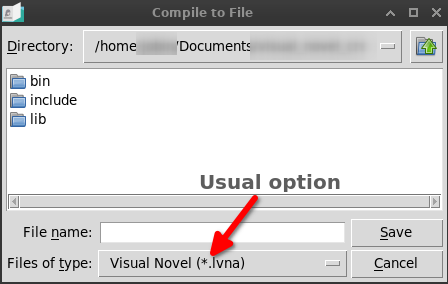
Sending an .lvna file to your viewers has a couple of challenges:
1) This file will only include your visual novel, not LVNAuth Player. Your viewers will need to know what to do with the .lvna file. They would need basic instructions for downloading and running LVNAuth.
2) Your viewers might download a version of LVNAuth that is not fully compatible with your visual novel. For example, they might download an older version of LVNAuth that doesn't support some of the commands in your visual novel.
To solve these challenges, the upcoming version of LVNAuth will provide two additional file types when exporting your visual novel using the Compile button.
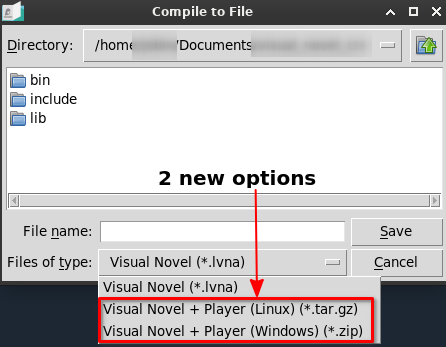
| New File Type | Description |
|---|---|
| .tar.gz | This archive will include your visual novel and the VN player engine for Linux. |
| .zip | This archive will include your visual novel and the VN player engine for Windows. |
The two new file types will end up including LVNAuth Player and your visual novel. If your viewers are on Linux, use .tar.gz to include LVNAuth Player for Linux, otherwise use .zip to include LVNAuth Player for Windows.
The viewers of your visual novel would just need to download the file, extract it, and run one file which will automatically play your visual novel. They won't need to download LVNAuth separately.
The version of LVNAuth that will be used to play your visual novel will be the same version that you used to compile it from.
This new feature is still being developed and is close to being finished.